
IDL tools on Solscan
Table of Contents
- Custom IDL
- IDL Discriminator Converter
- IDL Dictionary
- IDL Account Data Decoder
- Viewing and Comparing IDLs on Program Pages
- Choosing the Right IDL Tool
Solscan provides a collection of IDL tools for applying custom IDLs, working with discriminators, decoding raw account data, and reviewing program IDL versions. This guide explains what each tool does and when to use it.
What Is a Solana Program IDL?
An Interface Definition Language (IDL) file describes a Solana program’s interface, including its instructions, accounts, arguments, data types, events, and errors. It helps explorers and applications convert raw program data into readable information.
For a more detailed explanation, see Solana Program IDL on Solscan.
Solscan’s IDL tooling supports different parts of the process, from applying a custom interface definition to inspecting and decoding on-chain data.
Custom IDL
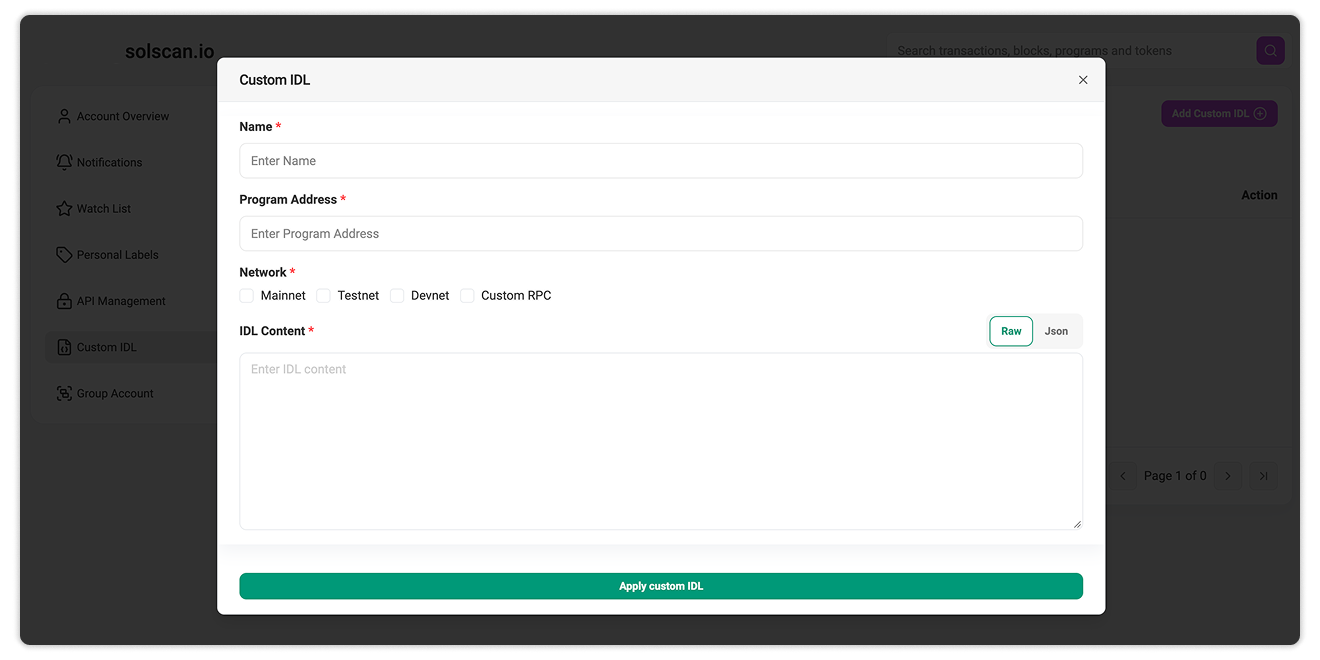
Custom IDL allows signed-in users to add an IDL for a program and use it when viewing related activity on Solscan.
This is useful when a program does not have a publicly available IDL on Solscan, or when you need to use a specific IDL version for your own analysis. Once applied, the custom IDL helps Solscan present supported program data in a more readable format.
Note: A Custom IDL is private and available only to the Solscan account that added it. It is not made public, shared with other users, or used to replace the program’s publicly available IDL.
To access Custom IDL:
- Sign in to your Solscan account.
- Open your profile.
- Navigate to the Custom IDL section.
- Click on "Add Custom IDL" and add in the required data.
- Apply custom IDL.
Add a Custom IDL on Solscan.
IDL Discriminator Converter
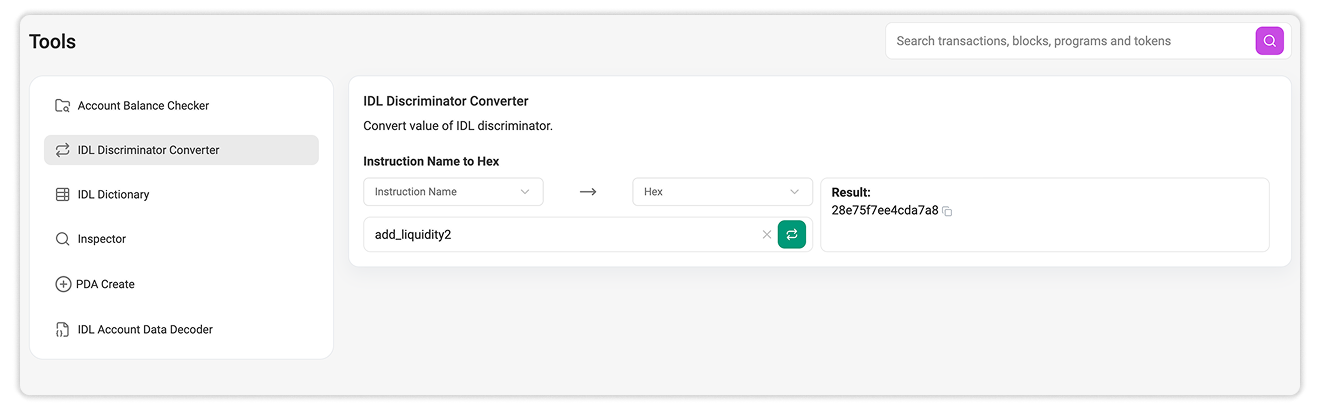
A discriminator is a sequence of bytes used to identify an instruction or account type. When inspecting raw Solana program data, the same discriminator may be represented in different formats.
The IDL Discriminator Converter supports three conversion options:
- Hex to Uint8Array: Converts a hexadecimal discriminator into a byte array.
- Uint8Array to Hex: Converts a byte-array discriminator into hexadecimal format.
- Instruction Name to Hex/Uint8Array: Generates the discriminator for an instruction name and returns it in both formats.
This tool is useful for comparing discriminator values across IDLs, raw transaction data, program logs, and development environments without converting them manually.
Open the IDL Discriminator Converter on Solscan.
IDL Dictionary
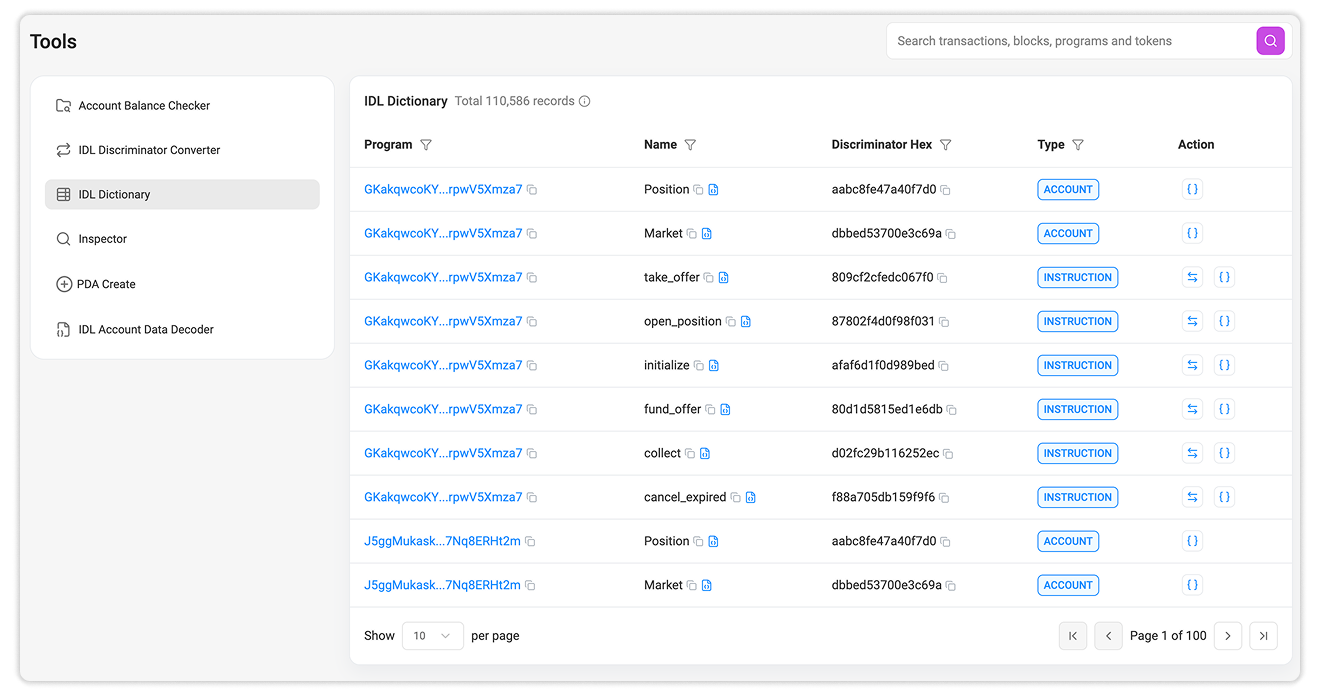
The IDL Dictionary provides a searchable reference for known program instructions and their associated discriminators.
You can filter the dictionary by:
- Program ID
- Instruction Name
- Discriminator Hex
- Type: Instruction, Event, or Account
Once you find the relevant entry, select the action button to open and inspect the program’s IDL on Solscan.
This is useful when identifying an unfamiliar instruction, matching a raw discriminator value to a readable instruction name, or locating the IDL associated with a specific program.
Explore the IDL Dictionary on Solscan.
IDL Account Data Decoder
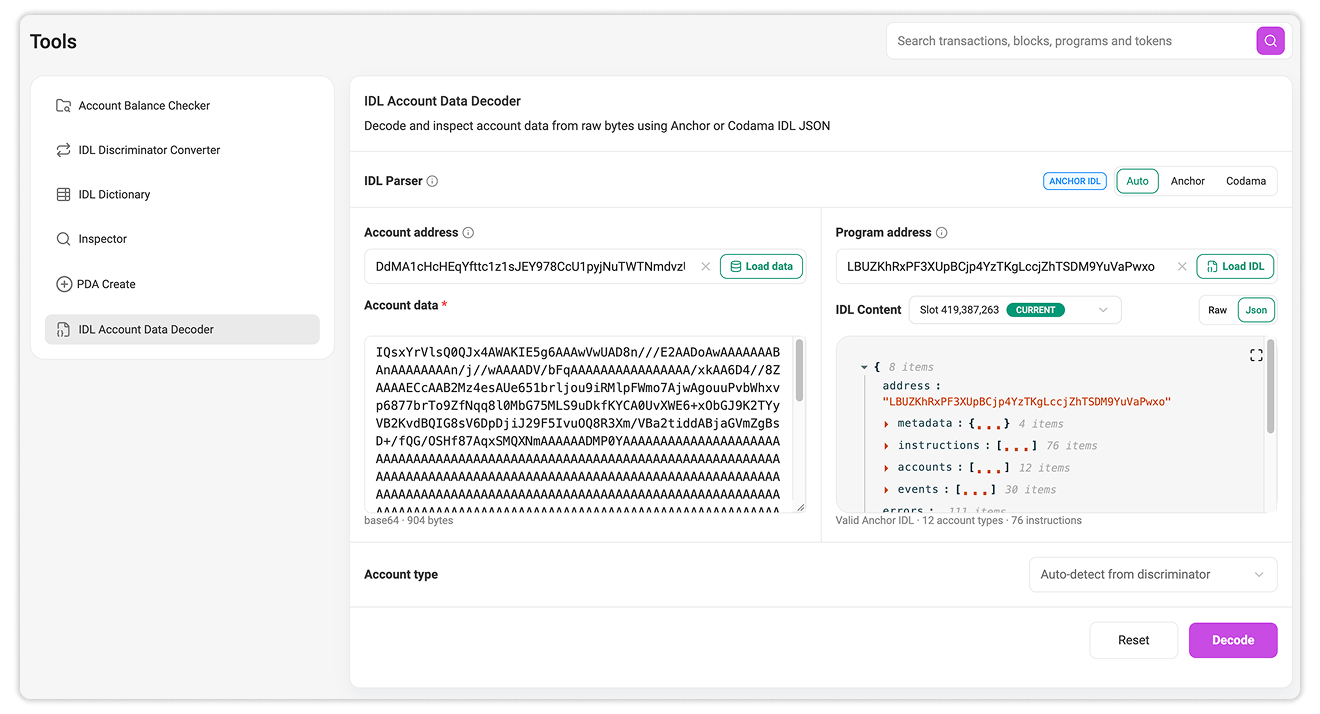
Solana accounts store program state as raw bytes. This data can contain information such as pool reserves, fees, configuration values, and permissions, but it commonly appears as an unreadable Base64 or hexadecimal string.
The IDL Account Data Decoder uses the program’s IDL as a schema to map those bytes to named fields and data types, returning structured, human-readable JSON directly in the browser.
The decoder requires two inputs:
- Raw account data: in Base64 or hexadecimal format
- The program’s IDL: in a supported Anchor or Codama format
You can paste these inputs manually or load them using the relevant account and program addresses:
- Enter the account address and select Load Data to retrieve its raw data.
- Enter the program address and select Load IDL to retrieve the available IDL.
- Select the parser format, or leave it set to Auto to detect a compatible IDL automatically.
- Select Decode to convert the raw bytes into structured JSON.
No local environment or decoding script is required. However, the result depends on the IDL matching the program, account type, and data version being inspected.
The decoder is also available from supported account pages:
- Market Account page: Open the Data tab.
- Program page: Open the Accounts Data tab and select an account.
Note: The IDL Account Data Decoder is available to signed-in users with a Solscan profile. Sign in or create a profile before using the tool.
Open the IDL Account Data Decoder on Solscan.
Viewing and Comparing IDLs on Program Pages
When a program has an available IDL, Solscan displays it under the Program IDL tab on the program page.
This tab provides several ways to inspect the program’s interface.
View the Current IDL
The current IDL represents the latest version available to Solscan. Users can inspect the complete JSON file or browse supported components such as instructions, accounts, arguments, data types, events, and errors.
View Historical IDLs
For programs with previously uploaded versions, Solscan also indexes historical IDLs. Selecting an earlier version makes it possible to inspect how the program interface appeared at that point in time.
Compare IDL Versions
The comparison feature places two selected IDL versions side by side and highlights their differences.
Users can also display unchanged regions when they need to review the complete files rather than only the differences.
For detailed information, see What can you do in the Program IDL tab on Solscan.
Choosing the Right IDL Tool
Each Solscan IDL tool supports a different part of the workflow.
| If you need to… | Use |
|---|---|
| Apply your own IDL when inspecting a program on Solscan | Custom IDL |
| Generate a discriminator from an instruction or account name | IDL Discriminator Converter |
| Look up known IDL entries or discriminator values | IDL Dictionary |
| Decode serialized account data into structured JSON | IDL Account Data Decoder |
| Inspect a program’s latest or previous IDLs | Program IDL tab |
| Identify changes between two IDL versions | Program IDL tab – Compare |
Frequently Asked Questions
No.
Custom IDL applies the IDL to your own experience on Solscan. It does not publish the file on-chain or replace the program’s public IDL.
The IDL may not match the program, account type, or version of the serialized data. Confirm that the correct IDL and account definition are being used.
Yes, when historical versions are available. Open the program’s Program IDL tab and select an earlier version from the version menu.
Summary
Solscan IDL Tools bring several IDL workflows into one explorer. Developers can apply custom definitions, work with discriminators, decode raw account data, inspect program interfaces, and compare how those interfaces change between versions.
Together, these tools make Solana program data easier to inspect without requiring developers to manually process every IDL file or serialized data structure outside Solscan.

Related Articles
Still Have Questions?
Supported Explorers
 Solscan
  Eclipsescan
  Fogoscan