
What You Can Do With Full Historical Data on Solscan
Full historical data is useful only when users can search it with enough context. On Solana, a single wallet, token, or program can have thousands, or even millions, of related records spanning transfers, swaps, staking actions, program interactions, and balance changes. Without filters, users still need to scroll through raw history or manually inspect signatures one by one.
Solscan now supports indexed full historical data search across major Solana activity views, including raw transactions, transfers, DeFi activities, and balance changes. This update allows users to access deeper historical records and combine them with Solscan’s advanced filters to search, narrow, and interpret on-chain activity more effectively.
Users can narrow large historical datasets by time, address, token involved, program involved, transfer value, decoded action, and other available fields depending on the page or activity table being used. Instead of starting from a long transaction list, users can begin with more specific research questions and surface the relevant records faster.
This article introduces several practical examples of how users can combine Solscan’s full historical data support with advanced filters for on-chain research across tokens, accounts, and whale transfers.
Use Case 1: Review Historical Token Activity and Value From Genesis
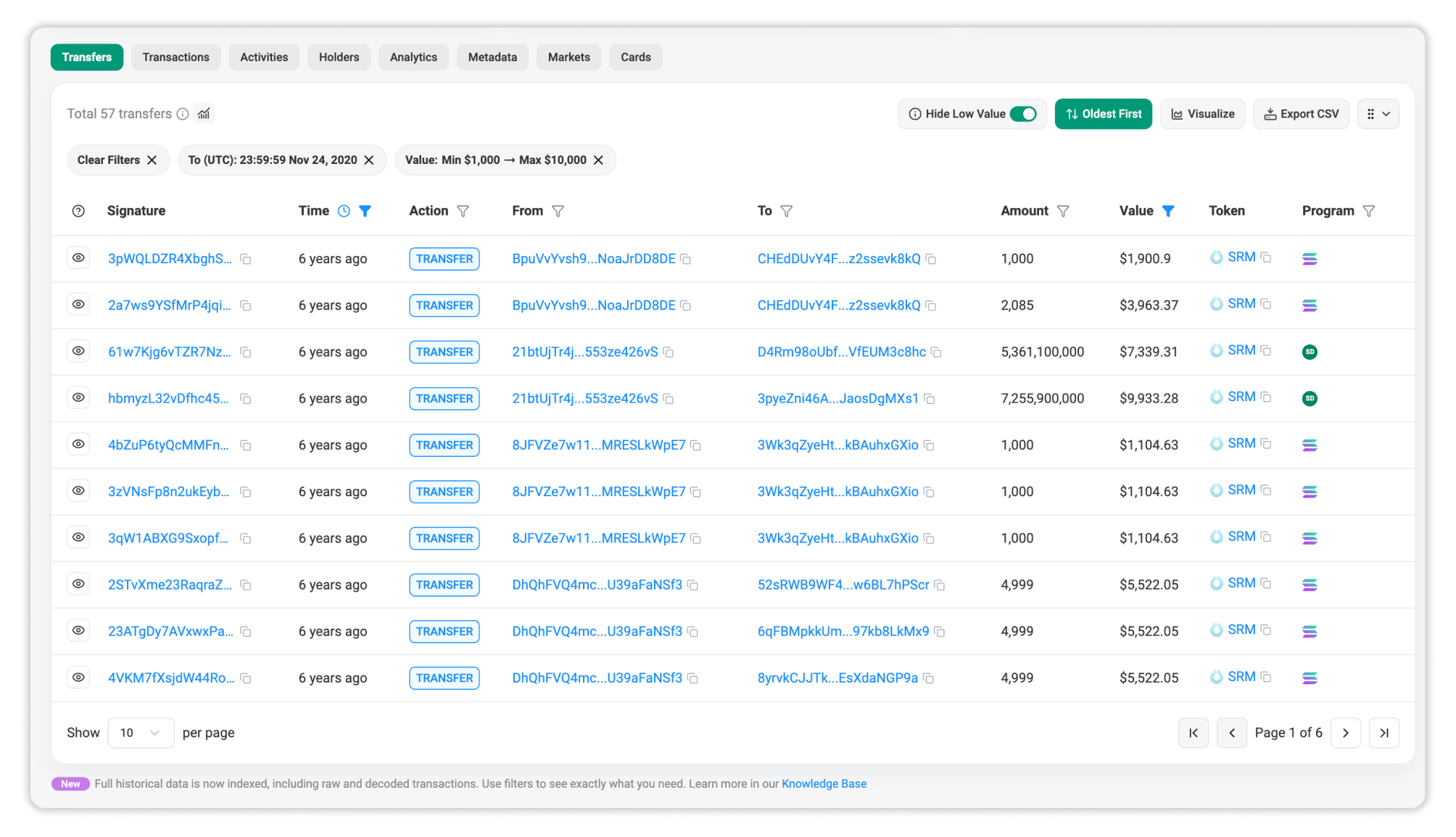
Suppose you want to assess the early performance of a long-standing token, such as $SRM, during the first few months after its mint.
Begin by navigating to the SRM token page on Solscan. From the token page, open the Transfers tab.
To review early historical activity:
- Sort the transfer records by Oldest First.
- Open the Time filter.
- Set the To Date to cover the first three months after the token’s mint.
- Apply the filter to narrow the table to early token activity.
- Optionally, use the Value filter to focus on transfers within a specific value range.
This allows users to review how the token moved during its early lifecycle instead of only checking recent activity.
Interpreting the Data
With full historical data, Solscan can surface early token transfer records and display calculated token value directly on the token page.
As shown in the example screenshot, even when records are sorted from oldest first, Solscan can still calculate and display historical price and value. This helps users review early token movement with value context from genesis till even the current period.
Use Case 2: Filter Direct Transfers From DeFi-Related Activity
Suppose you want to review direct wallet-to-wallet transfers for a specific wallet, without mixing them with DeFi-related movements such as swaps, staking activity, liquidity actions, or aggregator routes.
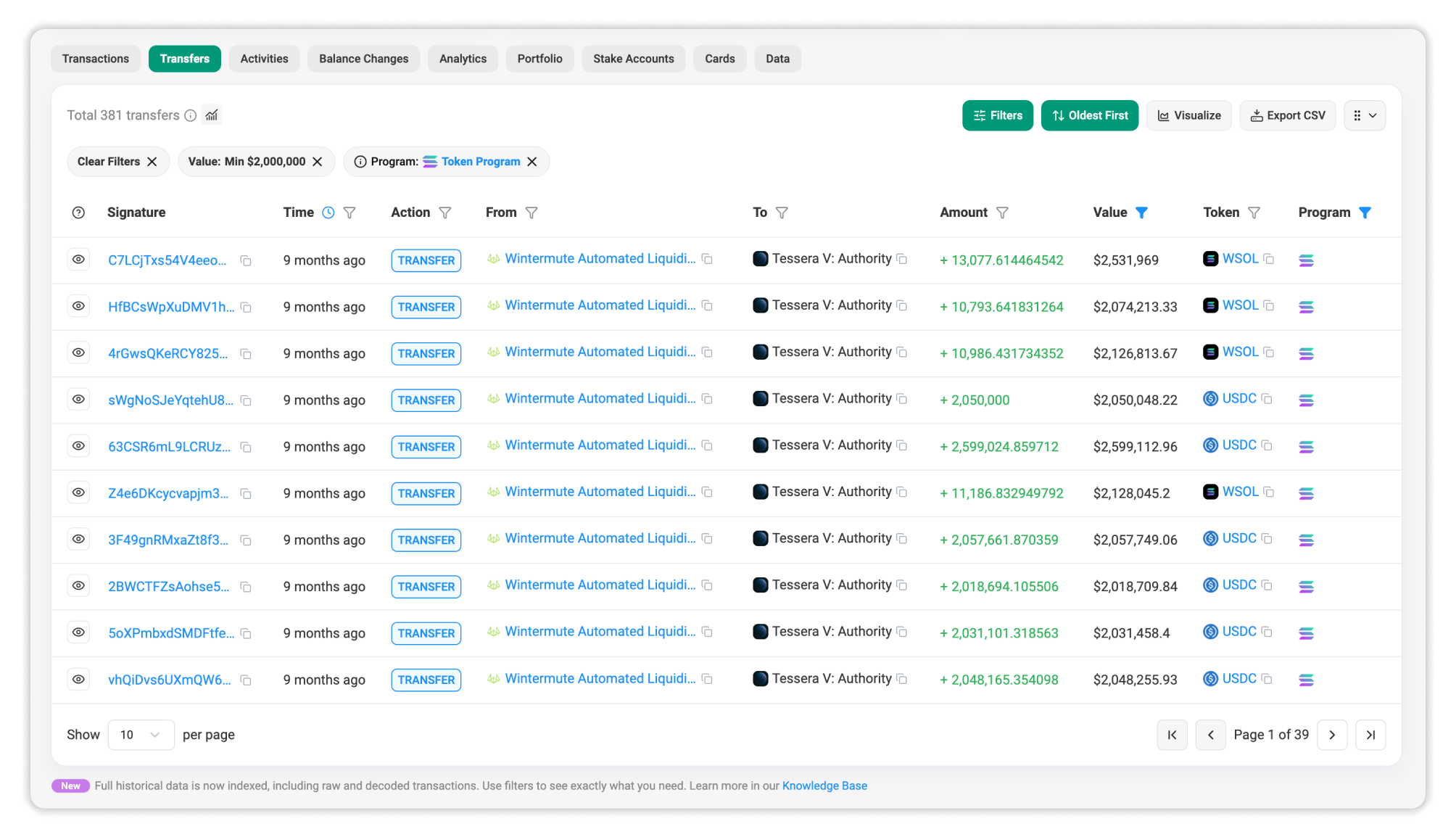
Begin by navigating to an account page on Solscan. From the account page, open the Transfers tab.
To isolate direct token transfers:
- Open the Program filter.
- Enter the SPL Token Program address:
TokenkegQfeZyiNwAJbNbGKPFXCWuBvf9Ss623VQ5DA - Apply the filter to show transfer activity involving the Token Program.
- Optionally, use the Value filter to focus on transfers within a specific value range.
This helps users reduce noise from broader DeFi activity and focus on direct token-transfer behavior.
Interpreting the Data
A direct transfer and a DeFi-related actions can both affect a wallet’s balance, but they do not represent the same action.
By filtering with the Token Program, users can better identify wallet-to-wallet token movement. The Value filter can also help users focus on larger transfers or specific value ranges.
Use Case 3: Track Whale Transfers Triggered by Program
Suppose you want to monitor large transfers connected to a specific program, such as a swap platform, aggregator, staking protocol, or other Solana application.
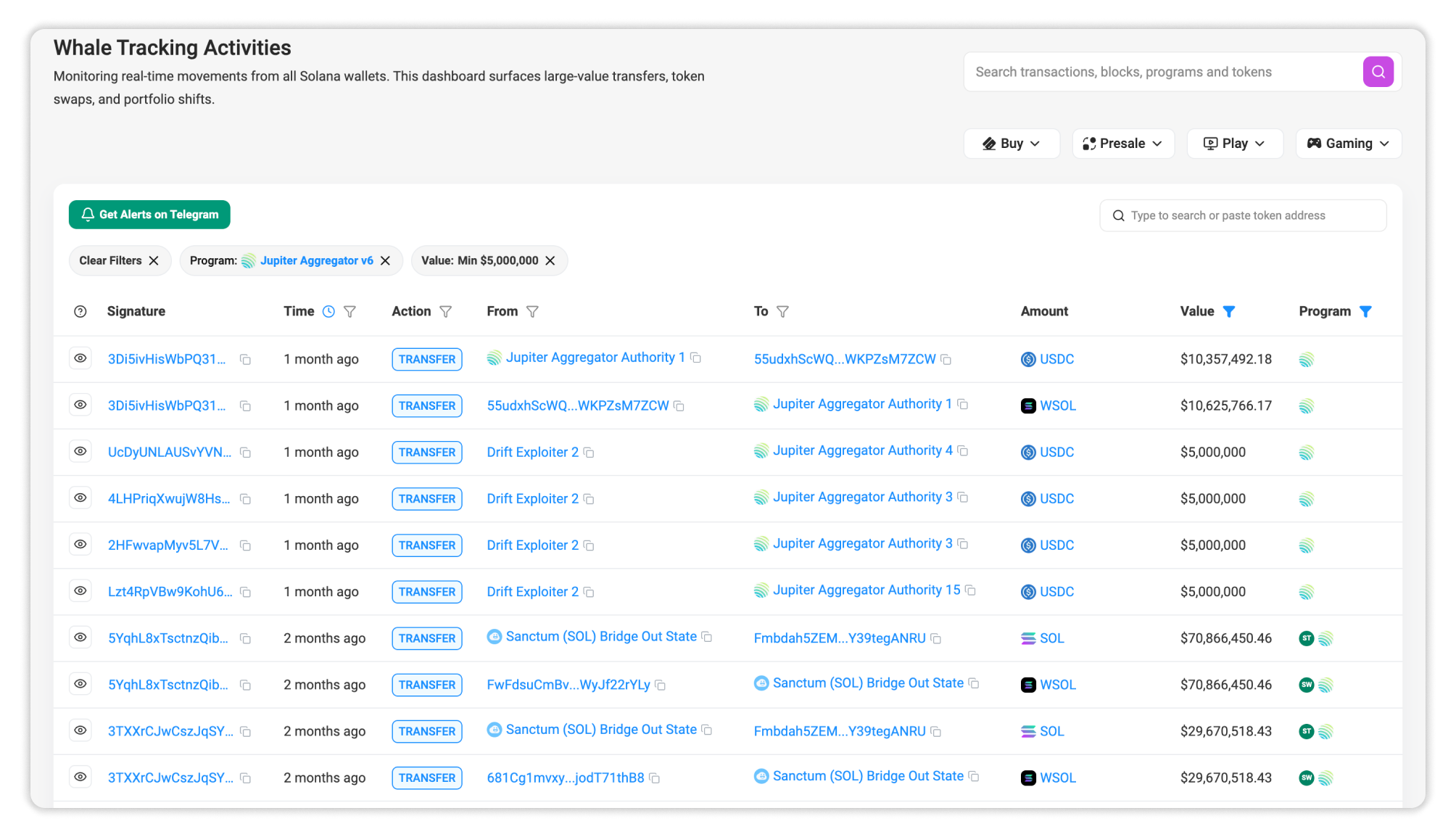
Begin by navigating to Solscan’s Whale Tracking Leaderboard. To track whale transfers triggered by program:
- Open the Program filter.
- Enter the target program ID.
- Apply the filter to show whale transfers involving that program.
- Optionally, apply a Value filter to focus on larger movements.
For example, users can filter whale transfers related to Jupiter’s program address: JUP6LkbZbjS1jKKwapdHNy74zcZ3tLUZoi5QNyVTaV4
This narrows the leaderboard to high-value activity connected to Jupiter.
Interpreting the Data
Program filtering helps users understand the context behind whale movement.
Instead of reviewing all large transfers together, users can focus on high-value activity related to a specific protocol. The Value filter can further narrow the dataset to transfers above a selected threshold.
More Ways to Use Full Historical Data
The three examples above show only part of what full historical data can support.
Users can apply similar methods to:
- Track wallet activity over long time periods
- Review historical program interactions
- Follow token flows across associated token accounts
- Filter DeFi activity by program or decoded action
- Check transfer value within a selected time range
- Support PnL, reporting, audit, and investigation workflows
The key improvement is not only access to older records. It is the ability to search historical data with structure.
Conclusion
Solscan’s full historical data update gives users a more complete view of Solana activity across wallets, tokens, and programs.
With advanced filters, users can move from raw history to targeted analysis. Whether the goal is tracking whale transfers, reviewing early token activity, or separating direct transfers from DeFi-related actions, Solscan makes historical data easier to search and easier to use.
Full history gives users the records. Structured filters help users find the signal.

Still Have Questions?
Supported Explorers
 Solscan
  Eclipsescan
  Fogoscan