
Address Poisoning on Solana
Table of Contents
- What Is Address Poisoning?
- Why Address Poisoning Works
- How Users Can Protect Themselves
- How Solscan Helps Users Identify and Reduce Address Poisoning Risk
- Conclusion
Address poisoning is a social engineering attack that tricks users into sending funds to the wrong wallet address. Instead of compromising your wallet or private keys, attackers manipulate transaction history by inserting lookalike addresses and hoping users will copy them during a future transfer.
While Solscan provides several helpful features to identify suspicious activity and manage trusted addresses more effectively, careful verification remains the best defense before signing any transaction.
What Is Address Poisoning?
Address poisoning is a scam technique where attackers insert deceptive wallet addresses into a user's transaction history, hoping the user will mistakenly copy and use the wrong address in a future transfer.
On Solana, this often takes the form of address spoofing. Scammers create or use wallet addresses that resemble a legitimate recipient’s address—typically matching the first and last few characters, since many users only verify those portions before confirming a transaction. If a user later copies the spoofed address from their transaction history instead of a trusted source, they may unknowingly send funds directly to the attacker.
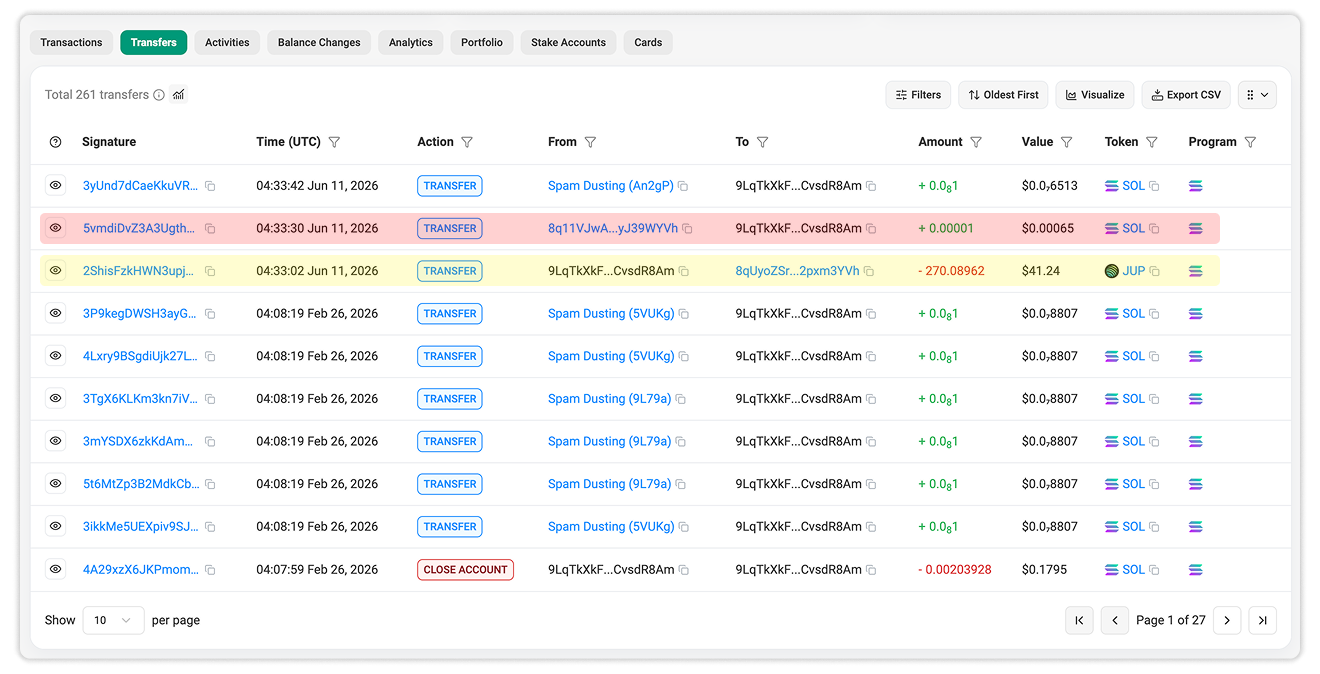
In the example above:
- The yellow-highlighted transaction is a legitimate transfer to the intended recipient.
- Approximately 28 seconds later, a transaction from a spoofed address appears in the history (red-highlighted transaction).
- The spoofed address is controlled by an attacker and is intentionally crafted to resemble the legitimate recipient's wallet address by matching some of its beginning (8q) and ending (YVh) characters.
Why Address Poisoning Works
Address poisoning works because blockchain addresses are long, difficult to memorize, and visually challenging to compare. As a result, users often identify addresses by checking only the beginning and ending characters. Attackers exploit this habit by using lookalike addresses that appear familiar when displayed in shortened form.
This attack is also effective because transaction history is often treated as a shortcut. Users may assume that an address appearing in their recent activity is safe because they have seen it before. That assumption can be dangerous. A wallet's transaction history may contain legitimate transactions, failed transactions, spam transfers, low-value transfers, and spoofing attempts.
How Users Can Protect Themselves
1. Always Copy the Receiver Address From a Trusted Source
The most important rule is simple: do not copy wallet addresses from transaction history. Instead, copy the receiver’s address directly from a trusted source. This may be the receiver’s official website, a verified contact, a wallet address book, an exchange deposit page, or another trusted internal record.
For recurring transfers, use an address book or a saved contact whenever your wallet supports it. This reduces the risk of selecting a spoofed address from your transaction list.
2. Always Double Check the Full Wallet Address
Before confirming a transaction, carefully verify the wallet address. For high-value transfers, compare the full address against the intended recipient's address.
Do not rely solely on the first and last few characters. Address poisoning attacks are specifically designed to exploit that habit.
3. Use a Unique Domain Name Where Possible
A domain name for your Solana wallet can make it easier to identify and harder to confuse with spoofed wallets. Instead of relying solely on a long wallet address, users can associate a recognizable domain name with their wallet, making it easier to distinguish trusted wallets from random lookalike addresses.
A domain name should not replace proper transaction verification, but it adds an extra layer of clarity when receiving funds, sharing an address, or identifying your own wallet across different interfaces.
How Solscan Helps Users Identify and Reduce Address Poisoning Risk
Solscan is a blockchain explorer. It does not control your funds, reverse transactions, or prevent a signed transfer from being executed. What it can do is provide better visibility and tools to help users review wallet activity more effectively.
1. Use Address Highlight in Site Settings
Solscan provides an Address Highlight feature in Site Settings.
When enabled, hovering over an address highlights other occurrences of the same address on the page. This helps users visually compare addresses and determine whether an address is truly repeated or simply looks similar.
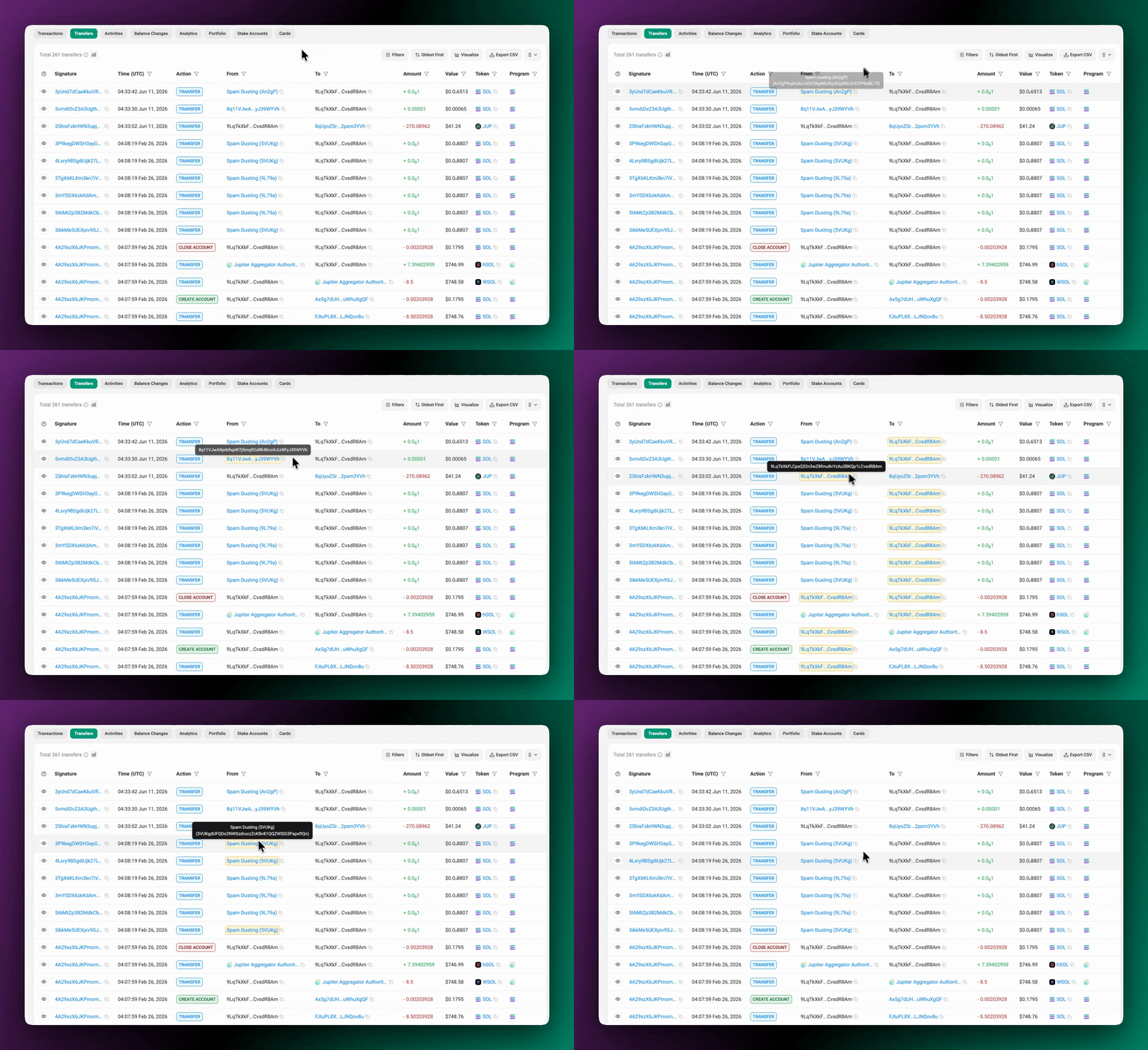
This feature is particularly useful when reviewing wallet pages, transaction details, or activity tables where multiple addresses appear close together. If a spoofed address is designed to resemble a legitimate one, Address Highlight can help users avoid relying on a quick visual scan.
To enable it:
- Go to Solscan Site Settings.
- Toggle on Address Highlight.
2. Use Personal Labels for Important Wallets
Solscan supports Personal Labels, also known as Private Names. These allow signed-in users to create custom labels for accounts they want to recognize more easily.
These labels are private to your Solscan account and help you identify frequently used or important wallets without relying solely on shortened addresses.
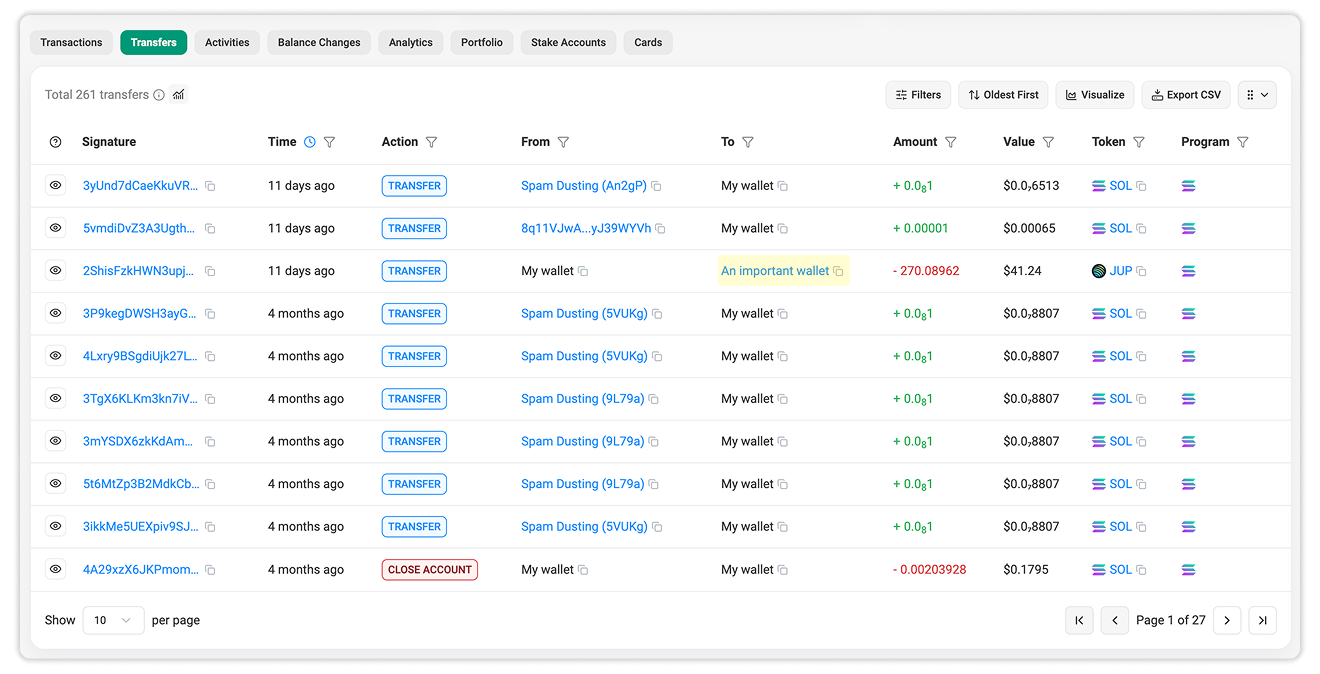
Personal Labels are particularly useful because address poisoning relies on confusion. When trusted wallets are clearly labeled, spoofed addresses become much easier to identify.
See the following guide for using this feature: How to add your own Personal Labels on Solscan.
3. Enable “Hide Low Value” and "Hide Spam" Transactions in Activity Tables
Address poisoning attempts often involve tiny-value transfers because the attacker's goal is not to move meaningful funds, but to place a spoofed address in your transaction history.
Solscan includes a filter called "Hide low value" and "Hide spam" transactions in activity tables. When enabled, this setting automatically hides tiny-value transfers that often create noise in wallet activity pages. This can make transaction reviews cleaner and reduce the likelihood of accidentally copying a spoofed address from low-value spam activity.
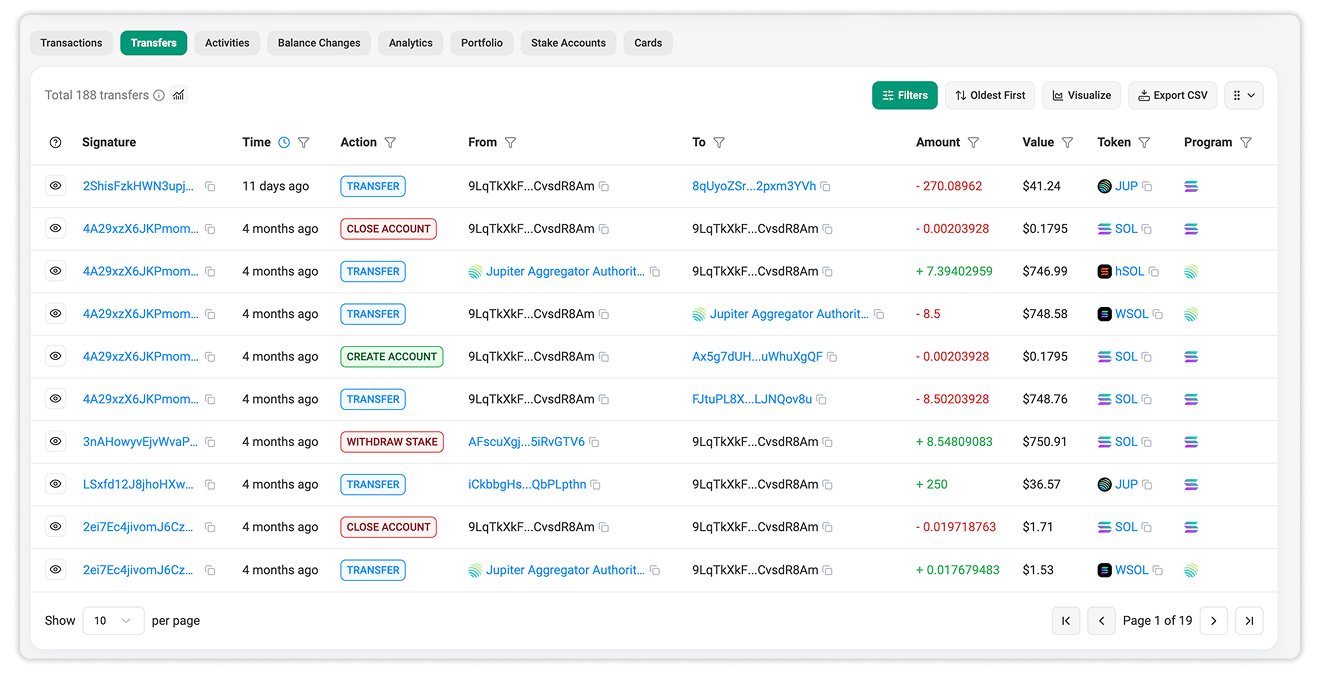
This feature is enabled by default. However, if you prefer to view the complete transaction history, you can disable it in Site Settings.
4. Check the Transfers Tab Alongside the Transactions Tab
When reviewing wallet activity on Solscan, we recommend using the Transfers tab alongside the Transactions tab. While the Transactions tab provides a broad overview of account activity, the Transfers tab offers a clearer view of asset movements.
The Transfers tab displays the token involved, transaction amount, and token reputation signals where available. This makes it easier to identify tiny or suspicious transfers and distinguish them from legitimate activity.
A practical review workflow:
- Open the wallet address on Solscan.
- Check the Transactions tab for general account activity.
- Open the Transfers tab to inspect actual token movements.
- Review the token, amount, sender, receiver, and reputation indicators.
- Treat tiny, unexpected transfers from unfamiliar addresses with caution.
Conclusion
Address poisoning has been an ongoing issue across blockchain ecosystems for years because it exploits common user habits rather than technical vulnerabilities. As long as users rely on transaction history, shortened address formats, or quick visual checks when sending funds, attackers will continue using address spoofing techniques to trick users into interacting with malicious addresses.
Solscan can help users review wallet activity more effectively through features such as Address Highlight, Personal Labels, the Transfers tab, token reputation indicators, and low-value transaction filters. Together, these tools make it easier to identify trusted wallets, reduce activity noise, and spot suspicious transactions.
While these features can improve visibility, users should always verify recipient addresses carefully and avoid relying solely on transaction history when sending funds.

Still Have Questions?
Supported Explorers
 Solscan
  Eclipsescan
  Fogoscan